
概要
Azure IoT Hub から Azure Storage にメッセージルーティンしたデバイス ツイン変更イベント(TwinChangeEventsデータソース)を Databricks で参照する方法を紹介します。
事前準備
環境構築
- Azure IoT Hub の構築 (本手順は Free tier で実施)
- Azure Storage の構築(Databricks 環境から接続できるように設定)
- Databricks (本手順は Serveless ではなく汎用コンピュートで実行)
Azure IoT Hub のマネージド ID に対して Azure Storage のストレージ BLOB データ共同作成者権限を付与


Azure IoT Hub にてカスタムエンドポイントを作成
Azure portal では作成する画面はないため、メッセージ ルーティングを作成するに同時に作成できます。

Azure IoT Hubs にてメッセージルーティンを設定


デバイスとモジュールの作成


メッセージルーティンの実施
事前準備
%pip install azure-iot-hub -q
dbutils.library.restartPython()
iot_conn_str = "HostName=iot-hub-test-0001.azure-devices.net;SharedAccessKeyName=iothubowner;SharedAccessKey=V/HbzmQCQJHBScUBCuXXXX="

デバイス twin に対する update_twin と replace_twin の実施
device_id = "qiita_test_device_01"

from azure.iot.hub import IoTHubRegistryManager
from azure.iot.hub.models import Twin, TwinProperties

# クライアント初期化
registry_manager = IoTHubRegistryManager(iot_conn_str)

try:
    # 現在のツインを取得
    twin = registry_manager.get_twin(device_id)
    print("変更前の Twin:", twin.as_dict()["properties"]["desired"].get("temp", None))

    # 更新内容を定義
    desired = {"temp": "100"}
    twin_patch = Twin(properties=TwinProperties(desired=desired))

    # 部分更新を実行(ETag を指定)
    updated_twin = registry_manager.update_twin(device_id, twin_patch, twin.etag)
    print("変更後の Twin:", updated_twin.as_dict()["properties"]["desired"].get("temp", None))
except Exception as ex:
    print("エラー:", ex)

from azure.iot.hub import IoTHubRegistryManager
from azure.iot.hub.models import Twin, TwinProperties

registry_manager = IoTHubRegistryManager(iot_conn_str)

# 現在のツインを取得
twin = registry_manager.get_twin(device_id)
print("変更前の Twin:", twin.as_dict()["properties"])

# 新しいツイン情報を構築
new_twin = Twin(
    properties=TwinProperties(
        desired={
            "key_1": "a",
            "key_2": "b",
            "key_3": "c",
        },
        reported=None  # reported プロパティは変更しない場合 None
    )
)
# ツイン全体を置換
replaced_twin = registry_manager.replace_twin(device_id, new_twin)
print("")
print("変更後の Twin:", replaced_twin.as_dict()["properties"])

モジュール twin に対する update_twin と replace_twin の実施
device_id = "qiita_test_device_01"
module_id = "qiita_test_module_01"

from azure.iot.hub import IoTHubRegistryManager
from azure.iot.hub.models import Twin, TwinProperties

# クライアント初期化
registry_manager = IoTHubRegistryManager(iot_conn_str)

try:
    # ① Twin を取得して現在値と etag を確認
    twin = registry_manager.get_module_twin(device_id, module_id)
    print("Before:", twin.properties.desired.get("temp"))

    # ② 差分だけを Twin Patch に詰める
    patch = Twin(properties=TwinProperties(desired={"temp": 100}))

    # ③ 部分更新(競合無視なら etag='*')
    updated = registry_manager.update_module_twin(
        device_id, module_id, patch, etag=twin.etag         # or etag="*"
    )

    print("After :", updated.properties.desired.get("temp"))
except Exception as ex:
    print("エラー:", ex)

from azure.iot.hub import IoTHubRegistryManager
from azure.iot.hub.models import Twin, TwinProperties

registry_manager = IoTHubRegistryManager(iot_conn_str)

# ① 現在のモジュール Twin を取得 (etag も受け取る)
twin = registry_manager.get_module_twin(device_id, module_id)  # ← module 用 API
print("置換前:", twin.properties.desired)

# ② Twin オブジェクトを丸ごと構築
# ※ Service 側からは tags と desired しか書き込めません
new_twin = Twin(
    properties=TwinProperties(
        desired={
            "key_1": "a",
            "key_2": "b",
            "key_3": "c",
        }
    )
)

# ③ etag を使って全置換 (競合無視なら etag="*")
replaced = registry_manager.replace_module_twin(
    device_id, module_id, new_twin, etag=twin.etag        # or etag="*"
)

print("置換後:", replaced.properties.desired)

Databricks におけるデータの読み込み
Azure Storage からデータを取得
Azure Storage からデータを取得します。
storage_account = "iothubstorage123"
container       = "qiitatest"

abfs_path = f"abfss://{container}@{storage_account}.dfs.core.windows.net/"
abfs_path += "iot-hub-test-0001/*/*/*/*/*/*"
src_df = (
    spark.read
         .format("avro")
         .load(abfs_path)
)
src_df.printSchema()
src_df.display()
src_df.printSchema()
src_df.display()
root
 |-- EnqueuedTimeUtc: string (nullable = true)
 |-- Properties: map (nullable = true)
 |    |-- key: string
 |    |-- value: string (valueContainsNull = true)
 |-- SystemProperties: map (nullable = true)
 |    |-- key: string
 |    |-- value: string (valueContainsNull = true)
 |-- Body: binary (nullable = true)

body列に対する decode の実施
from pyspark.sql.functions import expr

df = src_df.withColumn(
    "Body",
    expr("decode(Body, 'UTF-8')")
)
df.display()
{
	"version": 3,
	"properties": {
		"desired": {
			"temp": "100",
			"$metadata": {
				"$lastUpdated": "2025-05-27T04:08:48.9093199Z",
				"$lastUpdatedVersion": 2,
				"temp": {
					"$lastUpdated": "2025-05-27T04:08:48.9093199Z",
					"$lastUpdatedVersion": 2
				}
			},
			"$version": 2
		}
	}
}

SystemProperties の userId がエンコードされたまま連携されていることを確認しました。

下記のコードでデコードできます。
from pyspark.sql.functions import expr

df = df.withColumn(
    "userId",
    expr("decode(unbase64(SystemProperties['userId']), 'UTF-8')"),
)
df.display()

<補足>Azure Storage に連携されるデータ
デバイス twin に対する update_twin のデータ
Properties
operationTimestamp: "2025-05-27T04:08:48.9093199Z"
iothub-message-schema: "twinChangeNotification"
opType: "updateTwin"
deviceId: "qiita_test_device_01"
hubName: "iot-hub-test-0001"

SystemProperties
twin-version: "3"
connectionDeviceId: "qiita_test_device_01"
contentType: "application/json"
contentEncoding: "utf-8"
correlationId: "2eaf33f41d3"
userId: "aW90LWh1Yi10ZXN0LTAwMDE="
enqueuedTime: "2025-05-27T04:08:49.0610000Z"

body
{
	"version": 3,
	"properties": {
		"desired": {
			"temp": "100",
			"$metadata": {
				"$lastUpdated": "2025-05-27T04:08:48.9093199Z",
				"$lastUpdatedVersion": 2,
				"temp": {
					"$lastUpdated": "2025-05-27T04:08:48.9093199Z",
					"$lastUpdatedVersion": 2
				}
			},
			"$version": 2
		}
	}
}

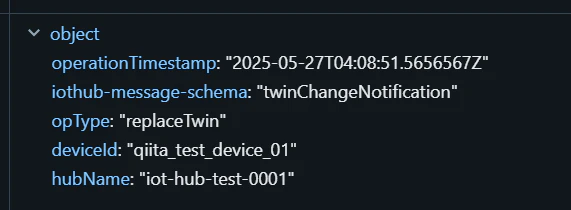
デバイス twin に対する replace_twin のデータ
Properties
operationTimestamp: "2025-05-27T04:08:51.5656567Z"
iothub-message-schema: "twinChangeNotification"
opType: "replaceTwin"
deviceId: "qiita_test_device_01"
hubName: "iot-hub-test-0001"
SystemProperties
twin-version: "4"
connectionDeviceId: "qiita_test_device_01"
contentType: "application/json"
contentEncoding: "utf-8"
correlationId: "2eaf4d2d8d1"
userId: "aW90LWh1Yi10ZXN0LTAwMDE="
enqueuedTime: "2025-05-27T04:08:51.5770000Z"

body
{
	"deviceId": "qiita_test_device_01",
	"etag": "AAAAAAAAAAM=",
	"version": 4,
	"properties": {
		"desired": {
			"key_3": "c",
			"key_1": "a",
			"key_2": "b",
			"$metadata": {
				"$lastUpdated": "2025-05-27T04:08:51.5656567Z",
				"$lastUpdatedVersion": 3,
				"key_3": {
					"$lastUpdated": "2025-05-27T04:08:51.5656567Z",
					"$lastUpdatedVersion": 3
				},
				"key_1": {
					"$lastUpdated": "2025-05-27T04:08:51.5656567Z",
					"$lastUpdatedVersion": 3
				},
				"key_2": {
					"$lastUpdated": "2025-05-27T04:08:51.5656567Z",
					"$lastUpdatedVersion": 3
				}
			},
			"$version": 3
		},
		"reported": {
			"$metadata": {
				"$lastUpdated": "2025-05-27T04:08:31.3307051Z"
			},
			"$version": 1
		}
	}
}

モジュール twin に対する update_twin のデータ
Properties
moduleId: "qiita_test_module_01"
operationTimestamp: "2025-05-27T04:08:56.0189103Z"
iothub-message-schema: "twinChangeNotification"
opType: "updateTwin"
deviceId: "qiita_test_device_01"
hubName: "iot-hub-test-0001"

SystemProperties
twin-version: "3"
connectionModuleId: "qiita_test_module_01"
connectionDeviceId: "qiita_test_device_01"
contentType: "application/json"
contentEncoding: "utf-8"
correlationId: "2eaf77b7232"
userId: "aW90LWh1Yi10ZXN0LTAwMDE="
enqueuedTime: "2025-05-27T04:08:56.0300000Z"

body
{
	"version": 3,
	"properties": {
		"desired": {
			"temp": 100,
			"$metadata": {
				"$lastUpdated": "2025-05-27T04:08:56.0189103Z",
				"$lastUpdatedVersion": 2,
				"temp": {
					"$lastUpdated": "2025-05-27T04:08:56.0189103Z",
					"$lastUpdatedVersion": 2
				}
			},
			"$version": 2
		}
	}
}

モジュール twin に対する replace_twin の実データ
Properties
moduleId: "qiita_test_module_01"
operationTimestamp: "2025-05-27T04:08:57.6127052Z"
iothub-message-schema: "twinChangeNotification"
opType: "replaceTwin"
deviceId: "qiita_test_device_01"
hubName: "iot-hub-test-0001"

SystemProperties
twin-version: "4"
connectionModuleId: "qiita_test_module_01"
connectionDeviceId: "qiita_test_device_01"
contentType: "application/json"
contentEncoding: "utf-8"
correlationId: "2eaf86e9cf5"
userId: "aW90LWh1Yi10ZXN0LTAwMDE="
enqueuedTime: "2025-05-27T04:08:57.6400000Z"

body
{
	"deviceId": "qiita_test_device_01",
	"moduleId": "qiita_test_module_01",
	"etag": "AAAAAAAAAAM=",
	"version": 4,
	"properties": {
		"desired": {
			"key_3": "c",
			"key_1": "a",
			"key_2": "b",
			"$metadata": {
				"$lastUpdated": "2025-05-27T04:08:57.6127052Z",
				"$lastUpdatedVersion": 3,
				"key_3": {
					"$lastUpdated": "2025-05-27T04:08:57.6127052Z",
					"$lastUpdatedVersion": 3
				},
				"key_1": {
					"$lastUpdated": "2025-05-27T04:08:57.6127052Z",
					"$lastUpdatedVersion": 3
				},
				"key_2": {
					"$lastUpdated": "2025-05-27T04:08:57.6127052Z",
					"$lastUpdatedVersion": 3
				}
			},
			"$version": 3
		},
		"reported": {
			"$metadata": {
				"$lastUpdated": "0001-01-01T00:00:00Z"
			},
			"$version": 1
		}
	}
}
