

Streamlitとは
StreamlitはPython向けのWebアプリケーションフレームワークです。
Streamlitを使うとフロントエンドの知識ゼロでもデータを可視化するためのWebアプリケーションを簡単に作れます。以下のような機能が特徴です。
- PythonのみでWebアプリケーションを作れる
- 変数を地の文に書くだけで、GUIに出力される(マジックコマンド)
-
st.radioやst.text_inputのようなAPIを呼び出すとGUIコンポーネントが生成され、ユーザが操作した結果はそのAPIの返り値として取得できる - PandasなどのDataFrameの表示をサポート
st.context とは
st.context は1.37.0でリリースされた機能です。
HTTPヘッダやCookieなど、フロントエンドで捌いている情報を取得できます。
1.45.0において、この機能で取得できる情報が強化されています。
st.user とは
st.user は1.45.0でリリースされた機能です。
st.login というStreamlitの認証機能でログインしたとき、ログインしたユーザの情報を取得できます。
Streamlit in Snowflakeの場合
Streamlit in Snowflakeでは2025/6/1時点では1.44.1までしか対応していないのですが、st.contextの一部プロパティとst.userのβ版であるst.experimental_userが使えます!
試してみましょう。

st.contextで見れる情報は限定的ですが、タイムゾーンが確認できるのはいいですね。
また、st.experimental_userでユーザのメールアドレスと、Snowflakeのユーザ名・ログイン名が確認できます!
自分でStreamlitをホストしてst.loginしたときと比較すると、かなりシンプルです。
{"email":"hoge@gmail.com","user_name":"SAKATOKU","login_name":"SAKATOKU"}
st.experimental_userの情報を参照してデータを見せる見せないを切り替えるのはSnowflake的にはバッドプラクティスですが(SnowflakeのRBACを使いましょう)、例えば
- ログイン名に紐付ける形で保存していたアプリ設定を引っ張ってくるために使う
- アプリの出力をメール送信するときのデフォルト送信先にする
などの使い方はあるかも!
stliteの場合
stliteが2025/6/11のアップデートでStreamlit 1.45.1に対応したため、st.contextの一通りのプロパティにアクセスできます。
ロケール、タイムゾーンだけではなく、ユーザが開いているURLをst.context.urlで取得できます。
自分はPCのローカルフォルダにHTMLファイルを置いて試したので以下のようにファイルパスが表示されました。用途は思いつかないですが、ちょっと新鮮。

ソースコードは以下のようになります。
<!doctype html>
<html>
  <head>
    <meta charset="UTF-8" />
    <meta http-equiv="X-UA-Compatible" content="IE=edge" />
    <meta
      name="viewport"
      content="width=device-width, initial-scale=1, shrink-to-fit=no"
    />
    <title>Stlite App</title>
    <link
      rel="stylesheet"
      href="https://cdn.jsdelivr.net/npm/@stlite/browser@0.83.0/build/style.css"
    />
  </head>
  <body>
    <div id="root"></div>
    <script type="module">
      import { mount } from "https://cdn.jsdelivr.net/npm/@stlite/browser@0.83.0/build/stlite.js";
      mount(
        `
import streamlit as st

st.caption("version")
st.write(st.__version__)

st.caption("st.context.cookies")
st.write(st.context.cookies)
st.caption("st.context.headers")
st.write(st.context.headers)
st.caption("st.context.ip_address")
st.write(st.context.ip_address)
st.caption("st.context.is_embedded")
st.write(st.context.is_embedded)
st.caption("st.context.locale")
st.write(st.context.locale)
st.caption("st.context.timezone")
st.write(st.context.timezone)
st.caption("st.context.timezone_offset")
st.write(st.context.timezone_offset)
st.caption("st.context.url")
st.write(st.context.url)

st.caption("st.user")
st.write(st.user)
`,
        document.getElementById("root"),
      );
    </script>
  </body>
</html>
Streamlit Playgroundの場合
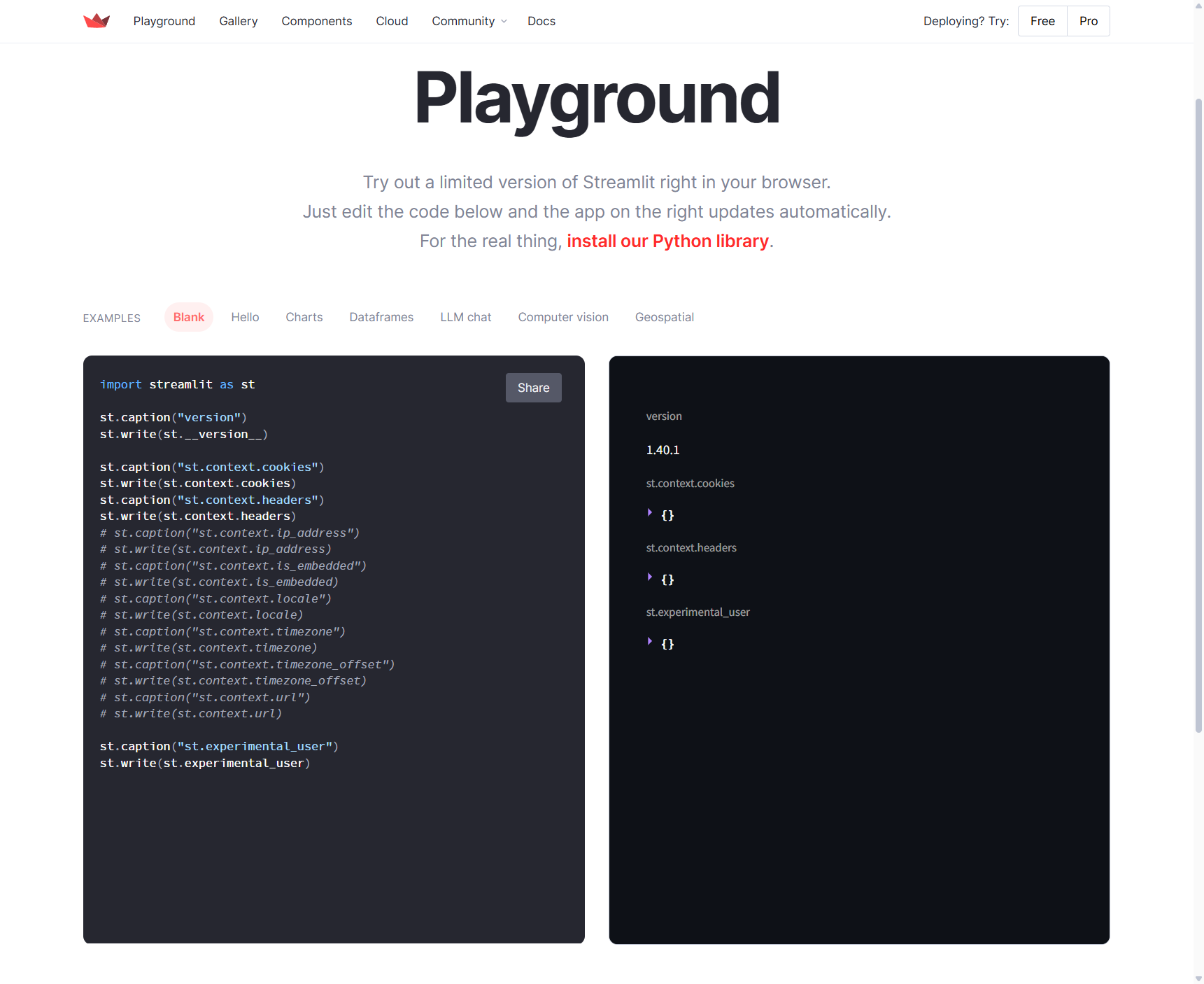
Streamlit Playgroundでは最新のstliteが反映されていないため、2026/6/14時点ではまだStreamlit 1.40.1までの対応でした。
ということでほとんど何も取れませんね。無念。
その他の環境では
この2つの機能、どのような環境で実行するかで取得できるものがちょっとづつ違います。
この先は自分の目で確かめてほしい!
いくつかの環境で試して追記しようと思います。お楽しみに。