
症状
OMEN by HP 16-k0059TXにUbuntuに入れたら音がでなかった.
SettingのSoundではOutputDeviceにDummy Outputしかない.
環境
| 属性 | 内容 |
|---|---|
| OS | Ubuntu 22.04 |
| カーネル | 6.2.0-39-generic |
| PC | OMEN by HP 16-k0059TX |
対処法
解決できた方法
Logにしたがった.
UbuntuにはありがたいことにLogというアプリケーションがあります.これを見てみると...
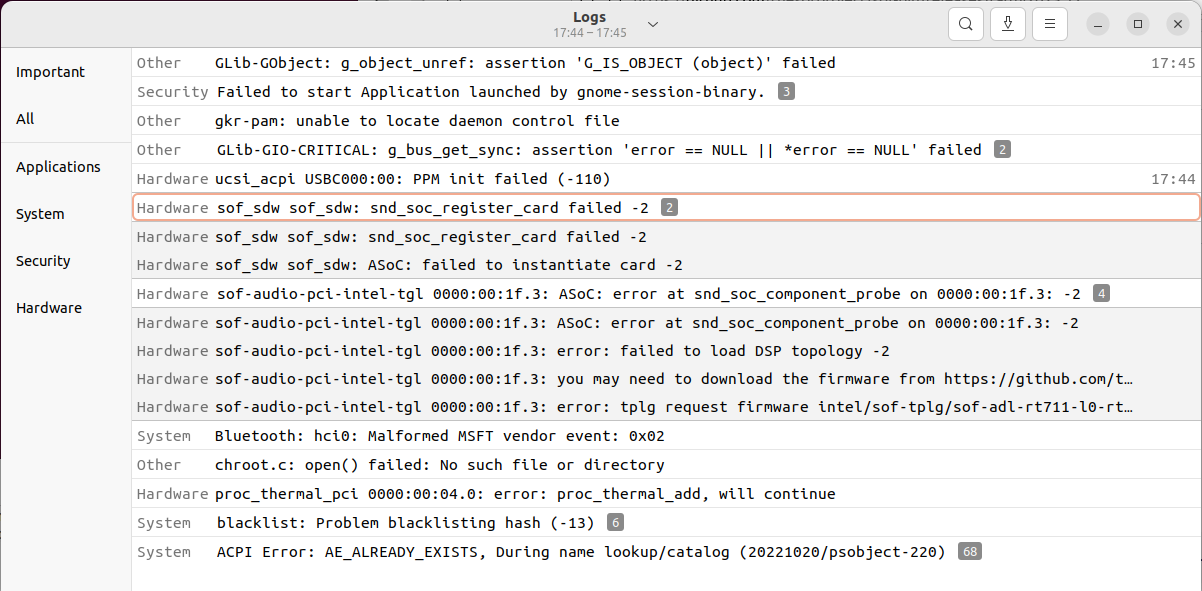
こんな感じに起動時のログが見れます.このログに
sof-audio-pci-intel-tgl 0000:00:1f.3: you may need to download the firmware from https://github.com/thesofproject/sof-bin/
という一文が見えます.
あとはリンク先にしたがってファームウェアを入れることで修正できました.
インストール方法はリンク先に書いてありますしバージョンごとに異なる可能性がありますが,一応ここにも書いておきます.
- Githubの右のカラムにあるReleasesを開く
- 最新または動きそうなバージョンの「.tar.gz」をダウンロードする.(補足:.tar.gzファイルはターボールとよく呼ばれてます.)
- ターボールの解凍先で次のコマンドを実行
sudo mv /lib/firmware/intel/sof* $(任意のバックアップ先1)/
sudo mv /usr/local/bin/sof-*     $(任意のバックアップ先2)/ # 任意.コピー元にsof-*が存在しないこともあります.
cd $(解凍後のフォルダ)
sudo ./install.sh
あとは再起動するとSettingのSoundにDummyOutputではなくSpeakerが表示されます.
ただし,自分の環境ではテストの音は出せませんでした.しかし,Youtubeの動画を見るとステレオでちゃんと再生されました.音質も問題ないように感じます.
だめだった方法
- pulseaudioの再インストール
- pulseaudioの再インストール前はBluetoothのヘッドフォンも使えなくなって困った.pulseaudio-module-bluetoothを再インストールして治った.
- カーネルのバージョン変更
- linux-image-6.1.0-1027-oem, linux-image-6.5.0-14-generic, linux-image-6.5.0-1009-oem