
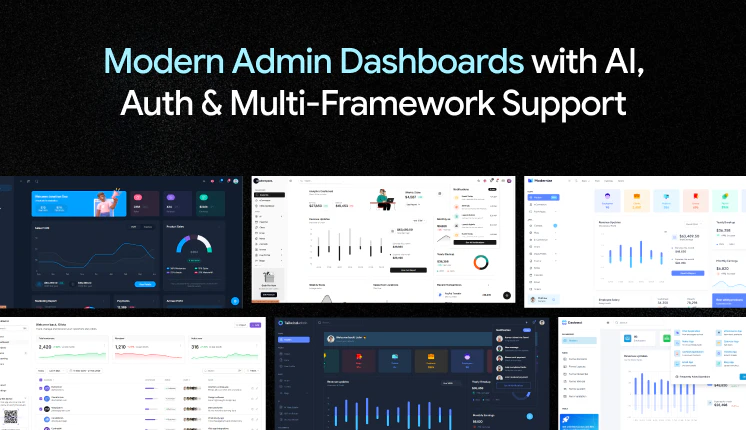
Dashboards are the backbone of business intelligence.
Whenever a business wants to grow faster, track revenue, monitor users, manage teams, or make better decisions, one thing becomes important very quickly: “Dashboards”
Today, dashboards are not just admin panels with charts.
They are used for:
- SaaS platforms
- AI tools
- CRM software
- eCommerce systems
- Banking apps
- Internal company tools
- Analytics platforms
For developers, dashboards are part of daily work.
Sometimes you need to build:
- Internal HR tools
- Analytics systems
- Multi-tenant SaaS products
- AI admin panels
- Reporting platforms
- Customer management systems
And honestly, nobody wants to build everything from zero every single time.
That is why modern dashboard templates became so important in 2026.
What Makes a Dashboard “Modern” in 2026 ?
In 2026, a modern dashboard is not only about design.
Frontend developers now expect:
- Latest framework support
- Ready-to-use authentication
- Copy-paste components
- AI-ready workflows
- Fast setup process
- Better folder structure
- Reusable UI blocks
- Charts and tables
- Theme customization
- Production-ready architecture
Most developers now prefer dashboards built with:
- Latest React
- Next.js
- Vue
- Tailwind CSS
- TypeScript
- shadcn/ui
- Material UI
- Tanstack
- Firebase
- NextAuth
Earlier developers used dashboards only for UI.
Now Web developers check:
- Architecture quality
- Authentication system
- Table performance
- AI integrations
- Folder structure
- Reusable components
- Scalability
- Update frequency
We tested all these dashboard templates based on:
- Developer experience
- Framework support
- UI ecosystem
- AI WorkFlow
- Scalability
- Performance
- Documentation quality
- Real production usage
- Live Support
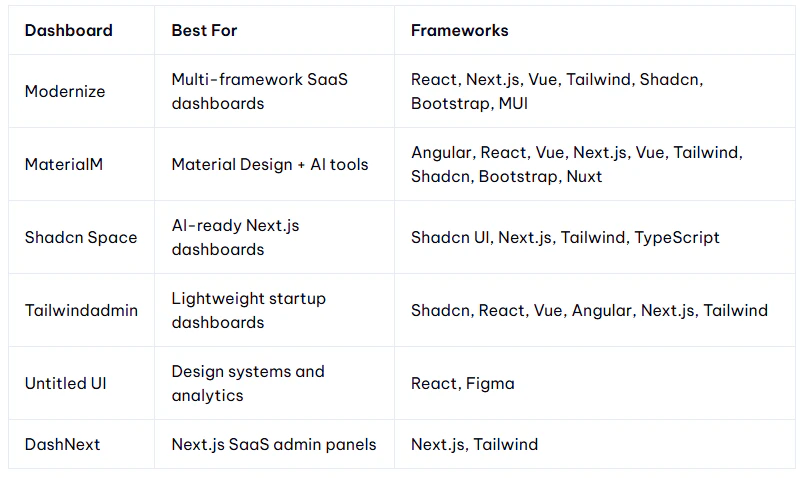
This guide breaks down six production-grade dashboard templates popular in 2026, comparing their framework support, component libraries, update frequency, and ideal use cases. Just framework compatibility and which one to pick for your next dashboard project.
Best Modern Dashboard Templates in 2026
Modernize Dashboard
It focuses on modern frontend development instead of limiting developers to one framework only. One of the biggest reasons developers like it is because it supports multiple frontend ecosystems together.
Modernize works exactly like its name.
Instead of rebuilding the same dashboard again and again, teams can use the same UI system across projects.

Best For: SaaS dashboards, enterprise admin panels, CRM systems, analytics platforms, internal company tools.
Key Features
- Vite.js support for faster builds
- TypeScript architecture
- SSR-ready structure
- Dark and light mode
- RTL support
- Live theme customization
- ApexCharts integration
- CRM and eCommerce apps included
- Invoice and Kanban pages
- CRUD operations
- Search and advanced filters
- Role-based authentication
- i18n multilingual support
- Inbuilt NextAuth
Dashboard Examples
- Analytics dashboard
- CRM dashboard
- eCommerce dashboard
- Kanban board
- Invoice management
- Chat applications
Frameworks Available In:
- Modernize React
- Modernize Next.js
- Modernize Vuejs
- Modernize Tailwind CSS
- Modernize Bootstrap 5
- Modernize Material UI
- Modernize Figma
Last Updated: 6th May 2026
MaterialM Dashboard
MaterialM is more focused on developer productivity and Material Design.
It is useful for teams building AI tools and enterprise dashboards & applications.
What makes this dashboard different is the built-in AI prompt system. Developers can use pre-built prompts directly inside the dashboard workflow which saves time during development.

Best For: AI dashboards, enterprise reporting systems, Material UI projects, admin panels, data-heavy applications.
Key Features
- 100+ UI components
- 3400+ font icons
- Material Design layouts
- Authentication pages included
- 690+ page templates in Pro version
- Multiple dashboard layouts
- ApexCharts support
- Data tables and calendars
- Chat and invoice applications
- Dark and light mode
- Modular code structure
- AI prompt discovery pages
- Reusable AI workflows
- Faster development process
- Inbuilt NextAuth
Dashboard Examples
- Sales dashboard
- Analytics dashboard
- CRM system
- Invoice dashboard
- AI Prompt Library
- User management pages
Frameworks Available In:
- MaterialM React + Tailwind CSS
- MaterialM Next.js + Tailwind CSS
- MaterialM Vue
- MaterialM Vuetify
- MaterialM Bootstrap
- MaterialM Nuxt
- MaterialM Angular
- MaterialM Shadcn
Last Updated: 12th May 2026
✅ Check out the original blog post: https://wrappixel.com/blog/modern-dashboard-templates