
検索機能(基本・シンプルバージョン)
JavaScript
フロー

コード
e.htm
<input id="search" />
<ul id="list"></ul>
e.js
const input = document.querySelector('#search');
const list = document.querySelector('#list');

let todos = [
  { id: 1, title: '買い物' },
  { id: 2, title: '勉強' },
  { id: 3, title: '運動' }
];

input.addEventListener('input', () => {
  renderTodos();
});

function renderTodos() {
  list.innerHTML = '';

  // ✅ ① 入力値取得
  const keyword = input.value;

  // ✅ ② filterで抽出
  const filteredTodos = todos.filter(todo =>
    todo.title.includes(keyword)
  );

  // ✅ ③ 描画
  filteredTodos.forEach(todo => {
    const li = document.createElement('li');
    li.textContent = todo.title;
    list.appendChild(li);
  });
}
- 入力値は DOM(input.value)にある
- filterしてるのは同じ
- renderが必要
Angular
コード
e.htm
<input [formControl]="searchControl" />

<ul>
  <li *ngFor="let t of filteredTodos">
    {{ t.title }}
  </li>
</ul>
e.ts
searchControl = new FormControl('');

todos: Todo[] = [
  { id: 1, title: '買い物', completed: false },
  { id: 2, title: '勉強', completed: false },
  { id: 3, title: '運動', completed: false }
];

// ✅ 派生状態
get filteredTodos() {
  const keyword = this.searchControl.value ?? '';
  return this.todos.filter(t =>
    t.title.includes(keyword)
  );
}
- 入力値も「状態」にする(DOMじゃない)
- filterはgetterでやる
- render不要
- 検索って実はCRUDのDeleteと同じ!ただし元データは変えずに表示だけ変える
検索機能(複数条件付き)
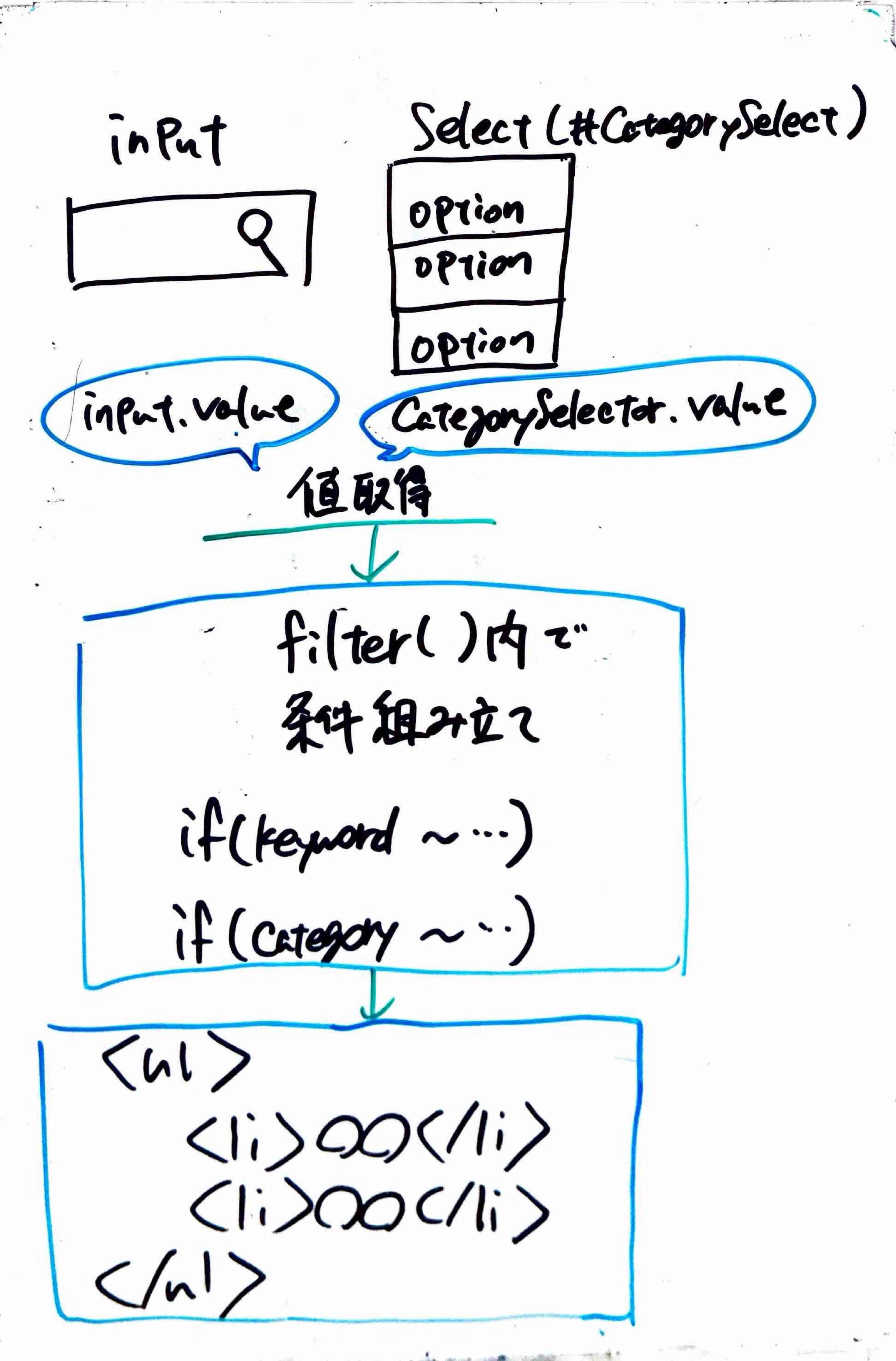
✅ 複数条件検索 =「filterの中で条件を組み合わせる」だけ
✅ Angularでは「状態を複数持って、それをまとめてfilterする」
JavaScript
フロー
コード
e.htm
<input id="search" placeholder="タイトル検索" />
<select id="category">
  <option value="">すべて</option>
  <option value="生活">生活</option>
  <option value="仕事">仕事</option>
</select>

<ul id="list"></ul>
e.js
const input = document.querySelector('#search');
const categorySelect = document.querySelector('#category');
const list = document.querySelector('#list');

let todos = [
  {
    id: 1,
    title: '買い物',
    memo: '牛乳を買う',
    category: '生活',
    completed: false,
    dueDate: new Date('2024-05-01')
  },
  {
    id: 2,
    title: '会議',
    memo: '資料準備',
    category: '仕事',
    completed: false,
    dueDate: new Date('2024-06-01')
  },
  {
    id: 3,
    title: '掃除',
    memo: '部屋を片付ける',
    category: '生活',
    completed: true,
    dueDate: new Date('2024-04-01')
  }
];

// 仮の期間入力(必要ならinput追加)
let from = null;
let to = null;

// 入力が変わるたびに再描画
input.addEventListener('input', renderTodos);
categorySelect.addEventListener('change', renderTodos);

function renderTodos() {
  list.innerHTML = '';

  // ✅ 入力値取得
  const keyword = input.value;
  const category = categorySelect.value;

  const filteredTodos = todos.filter(t => {

    // ✅ ① テキスト(タイトル or メモ)
    const matchText =
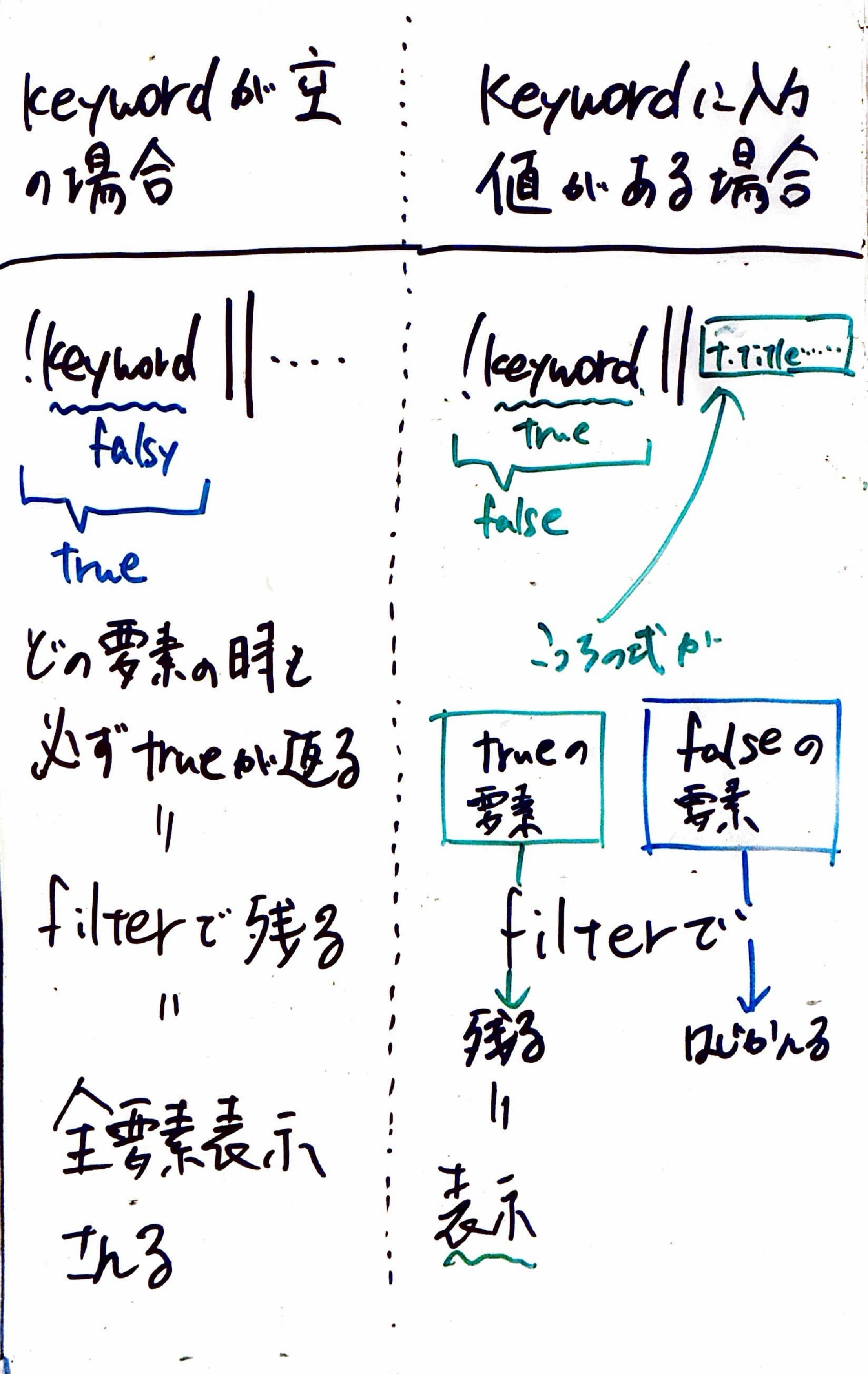
      !keyword ||
      t.title.includes(keyword) ||
      t.memo?.includes(keyword);

    // ✅ ② カテゴリ
    const matchCategory =
      !category || t.category === category;

    // ✅ ③ 日付
    const matchFrom =
      !from || t.dueDate >= from;

    const matchTo =
      !to || t.dueDate <= to;

    // ✅ 全条件
    return (
      matchText &&
      matchCategory &&
      matchFrom &&
      matchTo
    );
  });

  // ✅ 描画
  filteredTodos.forEach(todo => {
    const li = document.createElement('li');
    li.textContent = todo.title;
    list.appendChild(li);
  });
}
- filterは
- true を返した要素だけ残る
- false を返した要素は消える
- ので、{}ブロックを書いた場合は必ず自分でreturnしてbooleanを返す必要がある
( {}なし=1行なら自動returnなので条件だけ書いて終わりでいい)
E.js
todos.filter(t => {
  t.title.includes(keyword);
});
→こう書いちゃうとreturnがないのでundefined(=false扱い)
👉 全部消える
Angular
コード
e.htm
<input [formControl]="searchControl" placeholder="タイトル検索" />

<select [formControl]="categoryControl">
  <option value="">すべて</option>
  <option value="生活">生活</option>
  <option value="仕事">仕事</option>
</select>

<ul>
  <li *ngFor="let t of filteredTodos">
    {{ t.title }}
  </li>
</ul>
e.ts
get filteredTodos() {
  const keyword = this.searchControl.value ?? '';
  const category = this.categoryControl.value;
  const from = this.fromDate.value;
  const to = this.toDate.value;

  return this.todos.filter(t => {

    // ✅ ① テキスト検索(タイトル or メモ)
    const matchText =
      !keyword ||                  //検索してない→全部OKにするための仕組み
      t.title.includes(keyword) || //タイトルまたは詳細メモに検索文字含まれててもtrue
      t.memo?.includes(keyword);

    // ✅ ② カテゴリ
    //カテゴリ未指定なら全部OK、指定してたら一致するものだけOK
    const matchCategory =
      !category || t.category === category;

    // ✅ ③ 期間
    const matchFrom =
      !from || t.dueDate >= from;

    const matchTo =
      !to || t.dueDate <= to;

    // ✅ 最終判定(全部満たす)
    return (
      matchText &&
      matchCategory &&
      matchFrom &&
      matchTo
    );
  });
}
ページネーション
配列の「一部だけ表示する」
JavaScript
フロー
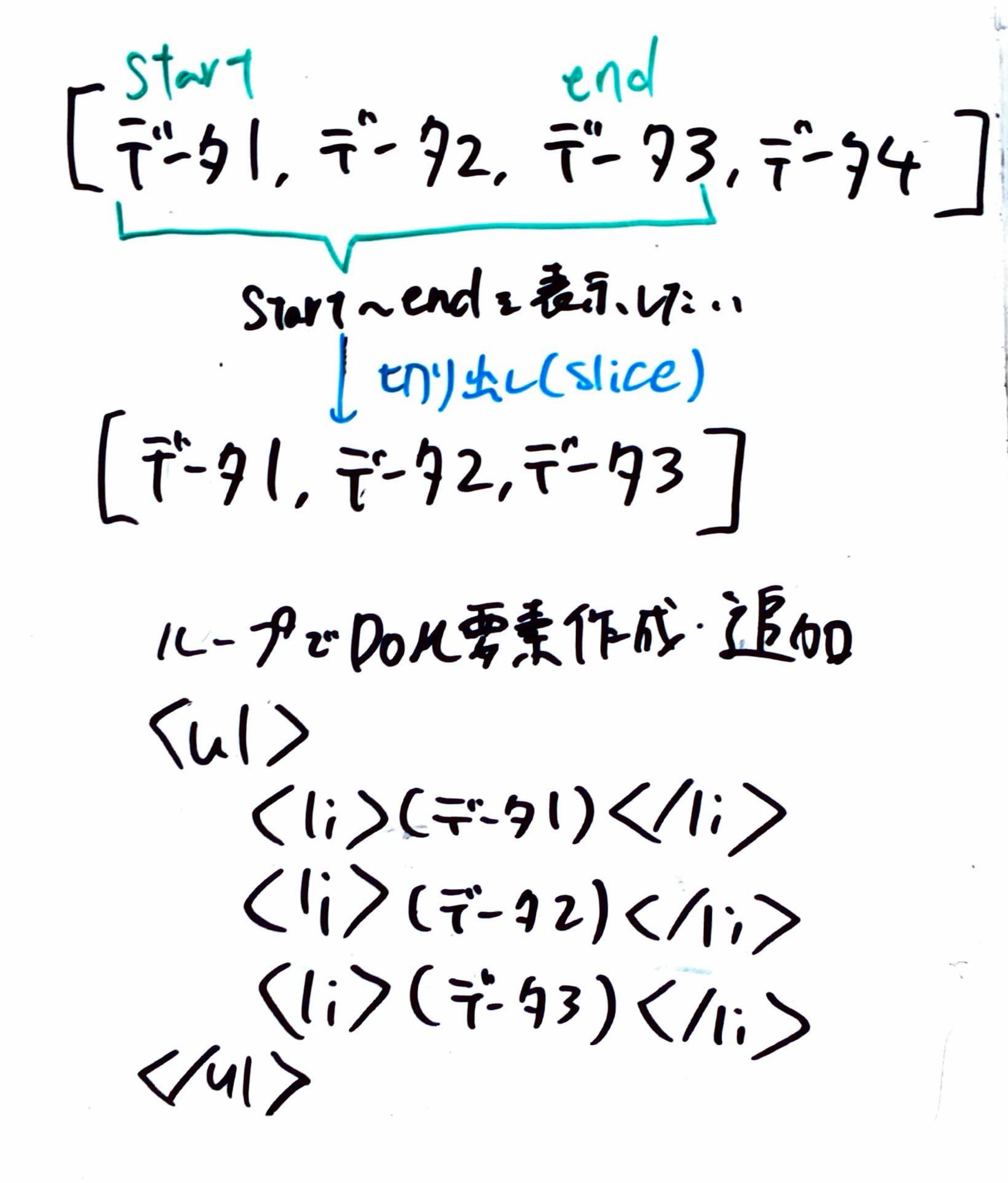
- start:
(currentPage - 1) * pageSize- (currentPage - 1) → 前に何ページあるか
- pageSize → 1ページに何件あるか
- つまり、前のページにあったデータ全部スキップする
- start~endの長さは固定
→ページの前後はどこまでのデータはスキップしていいか(=start)をずらせば可能
コード
e.js
let currentPage = 1;//今何ページ目か
const pageSize = 3;//1ページに何件表示するか

function renderTodos() {
  list.innerHTML = '';

  // ✅ ① 範囲計算
  const start = (currentPage - 1) * pageSize;
  const end = start + pageSize;

  // ✅ ② sliceで切り出し
  const visibleTodos = todos.slice(start, end);

  // ✅ ③ 描画
  visibleTodos.forEach(todo => {
    const li = document.createElement('li');
    li.textContent = todo.title;
    list.appendChild(li);
  });
}

//ページ移動
function nextPage() {
  currentPage++;
  renderTodos();
}

function prevPage() {
  currentPage--;
  renderTodos();
}
Angular
フロー
- currentPageを状態として持つ
- getterでsliceした派生状態を取得→*ngForで表示
コード
E.htm
<ul>
  <li *ngFor="let t of pagedTodos">
    {{ t.title }}
  </li>
</ul>

<button (click)="currentPage = currentPage - 1">前へ</button>
<button (click)="currentPage = currentPage + 1">次へ</button>
e.ts
currentPage = 1;
pageSize = 3;

todos: Todo[] = [
  { id: 1, title: '1' },
  { id: 2, title: '2' },
  { id: 3, title: '3' },
  { id: 4, title: '4' },
  { id: 5, title: '5' }
];

// ✅ 派生状態
get pagedTodos() {
  const start = (this.currentPage - 1) * this.pageSize;
  const end = start + this.pageSize;

  return this.todos.slice(start, end);
}