2
0

Delete article

Deleted articles cannot be recovered.

Draft of this article would be also deleted.

Are you sure you want to delete this article?

【UE5】Visual Studio で Android に起動引数を渡してデバッグする

Last updated at Posted at 2025-12-07

Visual Studio で Android をデバッグする方法に関しては、実は公式ドキュメントに全部書いている。

Debugging Unreal Engine Projects for Android in Visual Studio with the AGDE Plugin | Unreal Engine Documentation | Epic Developer Community

起動時に引数を渡すには、Project > Properties > Debugging > Launch Flags に以下を入力する。Project > Properties のウィンドウは Alt+F7 でも開ける。

-e cmdline \"引数\"
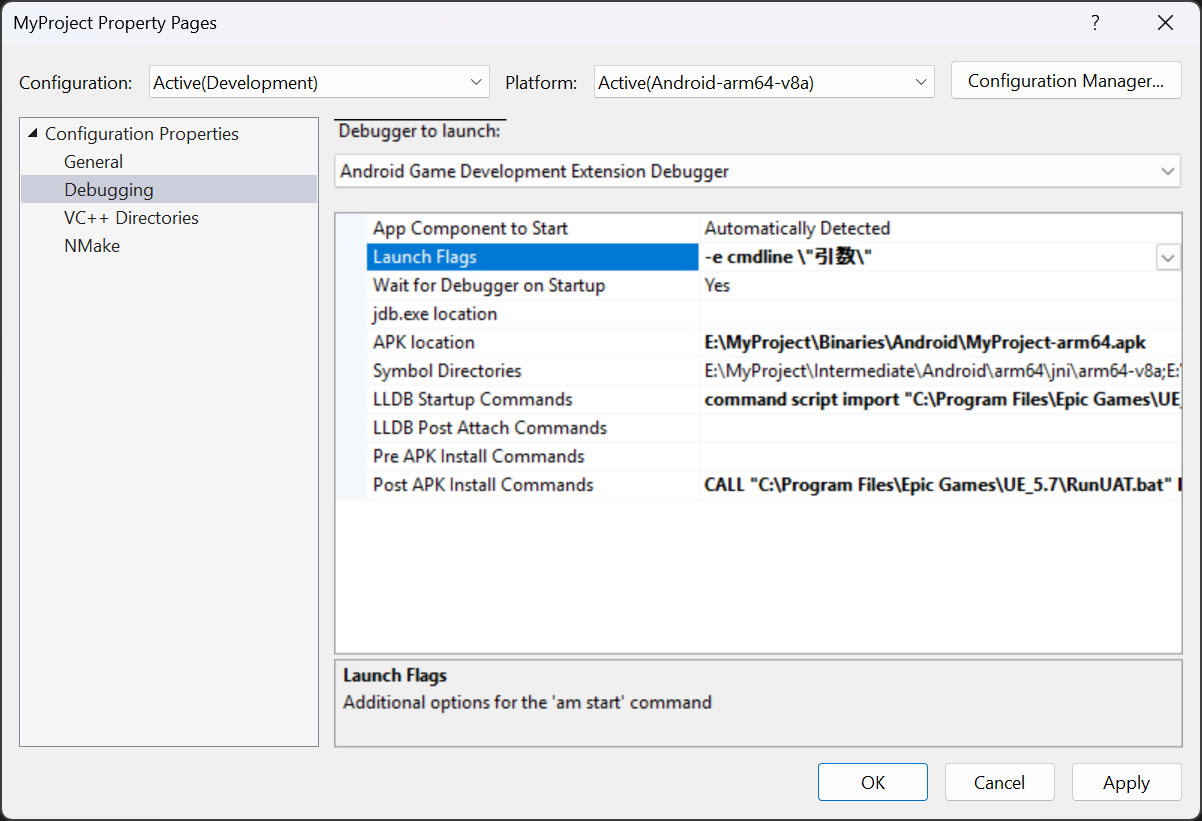
image.png

例えば、Unreal Insights でプロファイリングする場合は以下のようになる。

-e cmdline \"-tracehost=127.0.0.1 -filetrace -loadtimetrace -statnamedevents -trace=Bookmark,Frame,CPU,GPU,LoadTime,File\"

Android での Unreal Insights の使い方に関しては、こちらの公式ドキュメントも参考に。

How to Use Unreal Insights to Profile Android Games for Unreal Engine | Unreal Engine Documentation | Epic Developer Community

2
0
0

Register as a new user and use Qiita more conveniently

  1. You get articles that match your needs
  2. You can efficiently read back useful information
  3. You can use dark theme
What you can do with signing up
2
0

Delete article

Deleted articles cannot be recovered.

Draft of this article would be also deleted.

Are you sure you want to delete this article?