3
4

Delete article

Deleted articles cannot be recovered.

Draft of this article would be also deleted.

Are you sure you want to delete this article?

More than 5 years have passed since last update.

MySQLを使おう

3
Last updated at Posted at 2017-04-21

MySQLを使おう

MySQLを使用する際に覚えておかなければならないこと
(覚えなくても、知っておく必要はある)

サーバー起動コマンド


mysql.server start

スクリーンショット 2017-04-22 4.37.20.png

サーバー停止コマンド


mysql.server stop
スクリーンショット 2017-04-22 4.37.01.png

mysql接続


mysql -u ユーザー名 -p パスワード

※パスワードを設定していなければ入力しなくても良い

例)


mysql -u root
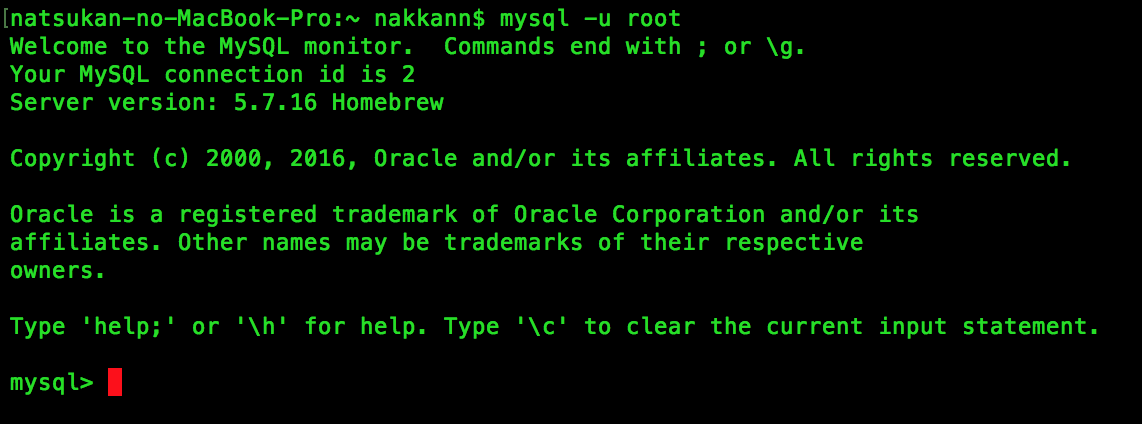
スクリーンショット 2017-04-22 4.37.32.png

下記の様になっていればSQL文を実行できる状態です。(MySQLに繋がっています。)


mysql>

ここからは、DBを作成してから、テーブル作成・・・
MySQLで行いたい作業を行なってください。

基本のコマンドなどなどはこちらに纏めておきます。(MySQLコマンド

関連リンク

リンク一覧
mac MySQLインストール手順

3
4
0

Register as a new user and use Qiita more conveniently

  1. You get articles that match your needs
  2. You can efficiently read back useful information
  3. You can use dark theme
What you can do with signing up
3
4

Delete article

Deleted articles cannot be recovered.

Draft of this article would be also deleted.

Are you sure you want to delete this article?
